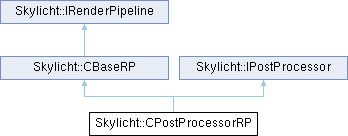
The object class supports post-processing such as Glow effects, Antialiasing using FXAA, and Exposure, Reflection...
More...
|
| virtual void | initRender (int w, int h) |
| virtual void | resize (int w, int h) |
| virtual void | render (ITexture *target, CCamera *camera, CEntityManager *entityManager, const core::recti &vp, int cubeFaceId=-1, IRenderPipeline *lastRP=NULL) |
| virtual void | postProcessing (ITexture *finalTarget, ITexture *color, ITexture *emission, ITexture *normal, ITexture *position, const core::recti &viewport, int cubeFaceId=-1) |
|
void | luminanceMapGeneration (ITexture *color) |
|
void | brightFilter (ITexture *from, ITexture *to, ITexture *emission) |
|
void | blurDown (int from, int to) |
|
void | blurUp (int from, int to) |
|
void | enableAutoExposure (bool b) |
|
bool | isEnableAutoExposure () |
|
void | setManualExposure (float f) |
|
float | getManualExposure () |
|
void | enableBloomEffect (bool b) |
|
bool | isEnableBloomEffect () |
|
void | enableFXAA (bool b) |
|
bool | isEnableFXAA () |
|
void | enableScreenSpaceReflection (bool b) |
| virtual bool | isEnableScreenSpaceReflection () |
|
void | enableLastFrameTexture (bool b) |
|
bool | isEnableLastFrameTexture () |
|
void | setBloomThreshold (float f) |
|
void | setBloomIntensity (float f) |
|
float | getBloomThreshold () |
|
float | getBloomIntensity () |
| virtual ITexture * | getLastFrameBuffer () |
| virtual bool | canRenderMaterial (CMaterial *m) |
| virtual bool | canRenderShader (CShader *s) |
| virtual void | setCamera (CCamera *camera) |
| virtual void | setNextPipeLine (IRenderPipeline *next) |
|
virtual void | onNext (ITexture *target, CCamera *camera, CEntityManager *entity, const core::recti &vp, int cubeFaceId) |
| virtual void | drawMeshBuffer (CMesh *mesh, int bufferID, CEntityManager *entity, int entityID, bool skinnedMesh) |
| virtual void | drawInstancingMeshBuffer (CMesh *mesh, int bufferID, CShader *instancingShader, CEntityManager *entityMgr, int entityID, bool skinnedMesh) |
|
virtual void | updateTextureResource (CMesh *mesh, int bufferID, CEntityManager *entity, int entityID, bool skinnedMesh) |
|
virtual void | updateShaderResource (CShader *shader, CEntityManager *entity, int entityID, video::SMaterial &irrMaterial) |
|
void | beginRender2D (float w, float h) |
|
void | renderBufferToTarget (float sx, float sy, float sw, float sh, SMaterial &material, bool flipY=true, bool flipX=false) |
|
void | renderBufferToTarget (float dx, float dy, float dw, float dh, float sx, float sy, float sw, float sh, SMaterial &material, bool flipY=true, bool flipX=false) |
|
void | renderEnvironment (CCamera *camera, CEntityManager *entityMgr, const core::vector3df &position, ITexture *texture[], int *face, int numFace, bool allPipeline) |
|
void | renderCubeEnvironment (CCamera *camera, CEntityManager *entityMgr, const core::vector3df &position, ITexture *texture, int *face, int numFace, bool allPipeline) |
|
void | unbindRTT () |
|
virtual ERenderPipelineType | getType () |
|
virtual void | render (ITexture *target, CCamera *camera, CEntityManager *entity, const core::recti &viewport, int cubeFaceId=-1, IRenderPipeline *lastRP=NULL)=0 |
|
virtual void | onNext (ITexture *target, CCamera *camera, CEntityManager *entity, const core::recti &viewport, int cubeFaceId)=0 |
|
|
void | initMainRTT (int w, int h) |
|
void | releaseMainRTT () |
|
void | renderEffect (int fromTarget, int toTarget, CMaterial *material) |
|
void | renderEffect (ITexture *fromTarget, ITexture *toTarget, CMaterial *material) |
|
void | disableTextureBilinear (SMaterial &m, int slot) |
|
void | enableTextureBilinear (SMaterial &m, int slot) |
|
void | setTarget (ITexture *target, int faceId) |
|
void | drawSceneToTexture (ITexture *target, CCamera *camera, CEntityManager *entityMgr, bool allPipeline) |
|
void | drawSceneToCubeTexture (ITexture *target, CCamera *camera, video::E_CUBEMAP_FACE faceID, CEntityManager *entityMgr, bool allPipeline) |
The object class supports post-processing such as Glow effects, Antialiasing using FXAA, and Exposure, Reflection...
On a smartphone, you shouldn't use too many of these effects as they can cause the device to heat up quickly and reduce the frame rate (FPS). However, You can use a Bloom Effect for smartphones.
Use the setPostProcessor function to attach a post-processor to the render pipeline. If you're using Deferred Rendering, attach the post-processor to that pipeline.
shadowMapRendering->setNextPipeLine(forwardRP);
if (postEffect == true)
{
CPostProcessorRP* postProcessor = new CPostProcessorRP();
postProcessor->enableAutoExposure(false);
postProcessor->enableBloomEffect(true);
postProcessor->enableFXAA(false);
postProcessor->enableScreenSpaceReflection(false);
postProcessor->initRender(w, h);
forwardRP->setPostProcessor(postProcessor);
}
forwardRP->initRender(w, h);
This object class will perform draw commands using "Forwarder rendering".
Definition CForwardRP.h:41
Shadow mapping pipeline for generating depth maps.
Definition CShadowMapRP.h:59

 1.17.0